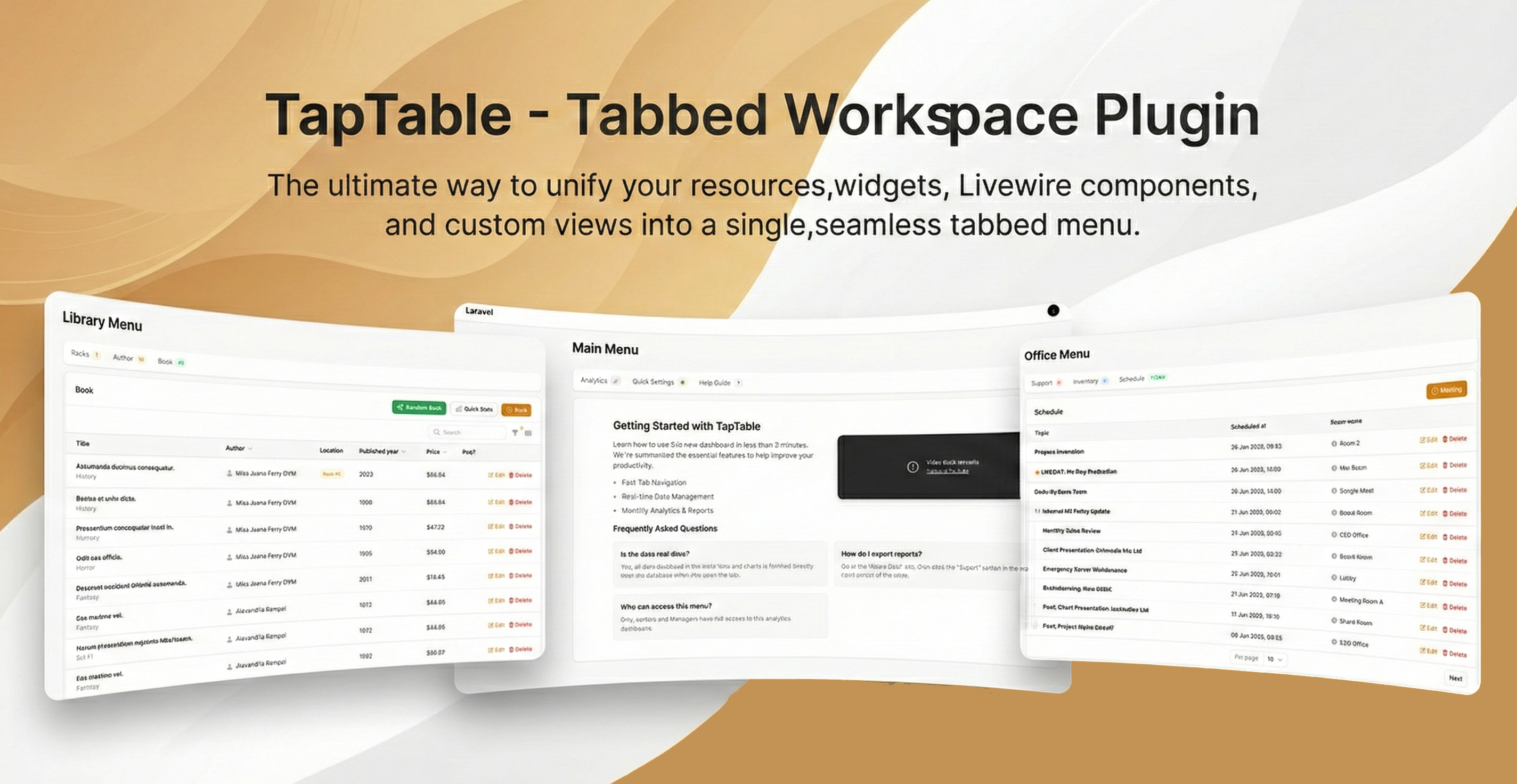
The Ultimate Menu Builders for Filament. Turn messy sidebars into sleek, app-like workstations. Mix Resources, Charts, Livewire Forms, and Blade Views in a single, state-isolated page.
🚀 Description
TapTable is a high-performance architectural plugin for Filament v3 that allows developers to group multiple unrelated components into a single "Tabbed Workspace".
Unlike standard tabs, TapTable offers True State Isolation. Search, pagination, and filters in one tab do not conflict with others. It supports a "Polyglot" architecture, meaning you can render a Resource Table next to a Livewire Chart or a Custom Setting Form without writing complex boilerplate.
✨ Key Features
- Universal Container: Render Resources, Widgets, Livewire Components, and Static Views in one place.
- State Isolation: Built-in
queryStringIdentifiermanagement ensures search/filter query strings never collide. - Ghost Resources: Easily hide Resources from the main sidebar (
showInNavigation => false) while keeping them accessible via tabs. - Smart Action Injection: Automatically inherits standard Filament actions (Create, Edit, Delete) within the tab context.
- Dynamic Badges: Support for real-time counts, status colors, and dynamic queries in tab labels.
- Responsive Tile Design: Compact, mobile-friendly tab navigation that maximizes screen real estate.
🛠 Requirements
- PHP 8.1+
- Laravel 10.x or 11.x
- FilamentPHP v3.x
📦 Installation
1. Configure Repository
Add the TapTable private repository to your composer.json file:
"repositories": [
    {
        "type": "composer",
        "url": "https://taptable.creator.ianstudios.id"
    }
]
2. Authentication
Before installing, authenticate your environment using the license key provided upon purchase:
composer config http-basic.taptable.creator.ianstudios.id license YOUR_LICENSE_KEY
3. Install Package
Run the composer require command:
composer require ianstudios/taptable
📖 Usage Guide
1. Register the Plugin
Open your Filament Panel Provider (e.g., app/Providers/Filament/AdminPanelProvider.php) and register the PagoraPosPlugin:
use Ianstudios\TapTable\TapTablePlugin; // Import the plugin

public function panel(Panel $panel): Panel
{
    return $panel
        ->default()
        // ... other configurations
        ->plugins([
            TapTablePlugin::make(), // Add this line
        ]);
}
2. Creating a Workspace Page
To create a tabbed page, simply create a standard Filament Page and extend Ianstudios\TapTable\Pages\TapTablePage. Define your tabs in the getTabs() method.
Example A: Mixed Content (Charts, Forms, & Views)
This example demonstrates how to build a Dashboard combining Analytics, Settings, and Help guides.
<?php

namespace App\Filament\Pages;

use Ianstudios\TapTable\Pages\TapTablePage;

class MainMenu extends TapTablePage
{
    protected static ?string $navigationIcon = 'heroicon-o-squares-2x2';
    protected static ?string $navigationLabel = 'Main Dashboard';
    protected static ?string $navigationGroup = 'TapTable';

    public function getTabs(): array
    {
        return [
            // 1. Livewire Widget (Chart)
            'Analytics' => [
                'livewire'   => \App\Filament\Widgets\RevenueChart::class,
                'badgeColor' => 'info',
                'badge'      => '📈',
            ],

            // 2. Livewire Component (Form)
            'Quick Settings' => [
                'livewire' => \App\Livewire\SimpleSettingsForm::class,
                'badge'    => '⚙️',
            ],

            // 3. Static Blade View
            'Help Guide' => [
                'view'       => 'filament.pages.help-content', // resources/views/filament/pages/help-content.blade.php
                'badge'      => '?',
                'badgeColor' => 'gray',
            ]
        ];
    }
}
Example B: Resource Management (The "Ghost" Feature)
This example shows how to group multiple resources into one page and hide them from the main sidebar using 'showInNavigation' => false.
<?php

namespace App\Filament\Pages;

use Ianstudios\TapTable\Pages\TapTablePage;

class OfficeMenu extends TapTablePage
{
    protected static ?string $navigationIcon = 'heroicon-o-lifebuoy';
    protected static ?string $navigationLabel = 'Office Utility';
    protected static ?string $navigationGroup = 'TapTable';

    public function getTabs(): array
    {
        return [
            // Tab with Dynamic Badge Query
            'Support' => [
                'resource'         => \App\Filament\Resources\TicketResource::class,
                'badge'            => fn() => \App\Models\Ticket::where('status', 'open')->count(),
                'badgeColor'       => 'danger',
                'showInNavigation' => false, // 👻 Hides the original link from sidebar
            ],

            'Inventory' => [
                'resource'         => \App\Filament\Resources\AssetResource::class,
                'badge'            => fn() => \App\Models\Asset::count(),
                'badgeColor'       => 'info',
                'showInNavigation' => false,
            ],

            'Schedule' => [
                'resource'         => \App\Filament\Resources\MeetingResource::class,
                'badge'            => 'TODAY', // Static Text Badge
                'badgeColor'       => 'success',
                'showInNavigation' => false,
            ],
        ];
    }
}
⚙️ Resource Configuration
Since TapTable renders resources inside a Widget context (not a standard ListRecords page), you must adjust where you define your Actions.
1. Header Actions (Create, Export, etc.)
Move any Header Actions from your ListRecords page to the table() method in your Resource file.
// In YourResource.php

public static function table(Table $table): Table
{
    return $table
        ->columns([...])
        ->headerActions([
            // Define global actions here instead of ListRecords page
            Tables\Actions\CreateAction::make(),
            Tables\Actions\ExportAction::make(),
        ])
        ->actions([...]);
}
2. Edit Action Behavior
By default, Filament looks for form definitions in the current context. In a widget, the context is empty. You must explicitly tell the Edit Action where to find the form schema.
Option A: Edit via Modal (Recommended) Keeps the user on the dashboard.
Tables\Actions\EditAction::make()
    ->form(fn (Form $form) => self::form($form)) // Force use of Resource form
    ->modalWidth('4xl')
Option B: Edit via Redirect Redirects to the standard Edit page.
Tables\Actions\EditAction::make()
    ->url(fn ($record) => self::getUrl('edit', ['record' => $record]))
⚠️ Important: Custom Views & Layouts
When using the 'view' or 'livewire' option to render custom pages, do not include the standard Filament Page wrapper (<x-filament-panels::page>) inside your Blade file.
TapTable already provides the layout wrapper. Including it again will result in double headers/layouts.
✅ Correct Blade View (resources/views/livewire/simple-settings-form.blade.php):
{{-- NO <x-filament-panels::page> HERE --}}
<div class="p-6">
    <h2 class="text-lg font-bold mb-4">Quick Settings</h2>
    <form wire:submit="save">
        {{ $this->form }}

        <x-filament::button type="submit" class="mt-4">
            Save Changes
        </x-filament::button>
    </form>
</div>
📄 License
TapTable is commercial software.
- Price: Starting from (€24) (One-time payment)
- License Type: Perpetual Commercial License.
- Usage: Single to Unlimited projects for the license holder.
Copyright © Ianstudios. All rights reserved.